

Nerdy’s Custom Entity Models gives you full control over player and entity rendering, letting you replace or modify what gets drawn on the screen. From custom first-person hand models to fully dynamic player skins, this plugin opens the door to all kinds of creative visual magic.
This is a java plugin and requires java plugins to be enabled
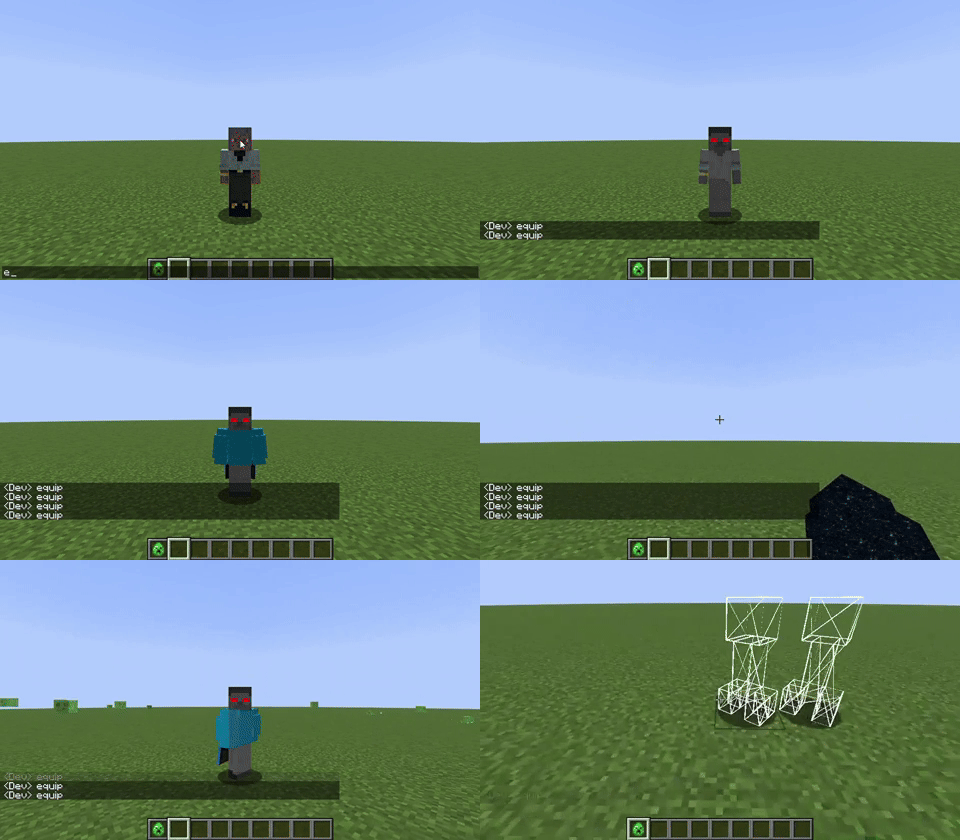
Before getting started working with your rendering logic, you will need to understand the four main concepts this plugin revolves around
Texture Location and Model variables
This plugin adds two new variable types to MCreator, Texture Location and Model.

Model variables can be used to render custom java models on entities with regular animations set to the model itself, while texture variables are used for all types of rendering. All global triggers in this plugin provide models and textures, which correspond to the model and texture of the entity/player being rendered.

To make the most optimal use of them, these variables can be cached as global variables to be reused. This will help reduce the performance impact of your mod as they will not need to be initialized every time your models are drawn.

Models must be cached using the "After model registration" global trigger when initially loading the mod, but afterwards they can be cached using other events so long as the code runs client-side.
Humanoid models
Humanoid models can be created using the new mod element added by this plugin.

These are a type of model that is automatically cached, and can follow the player model's rotations by assigning model parts to certain groups that correspond to parts of the player.

Rendering custom models on entities
Custom models being rendered on non-player entities should be rendered using the "On entity rendered" global trigger.

You can also render the entity's original model with a different texture or render type using the dependencies provided, for which case you will need to hide the base model of the entity so as not to have them overlap.

Rendering custom arm models in first person
Custom first person arm models can be rendered using the "On arm rendering" global trigger. The same principles of entity rendering apply here. You can either render a copy of the vanilla player arm, or the arm of a humanoid model mod element.
 |
 |
Rendering custom models on players
Custom skins or humanoid models must be rendered using the "On player rendering" global trigger. You should absolutely not render models on the player during the "On entity rendering" global trigger.
 |
 |
It is best to avoid cancelling this event as that would mean none of the player's model layers will appear anymore. If you really must hide the base player model, you can do so by disabling its model parts to make it disappear.

It is also possible to apply cape physics to a rendered humanoid model's parts by using this procedure block right before the rendering process of the model.


Changelog
v1.2.1
-Fixed issues when rendering humanoid model arms with arm rendering procedure blocks

v1.2
-Added a procedure block to hide humanoid model parts from humanoid models
-Added a procedure block to check if the player is in first person

v1.1.2
-Fixed the variable improvements causing a build error in 1.21.1

v1.1.1
-Improved player variable syncing code
-Updated player variable syncing code for the 1.20.1 generator to work with the latest version

v1.1
-Added a new procedure block to render a copy of an entity's model on an entity
-Added a new procedure block to render a non-humanoid model on a player
-Added the option to set a max parameter on humanoid model upwards cape rotation
-Added new global trigger to change the hitbox of entities
-Added new procedures to change the hitbox of entities
-Removed the get model from entity procedure block as it would always crash when trying to render it

v1.0
-Plugin releaseComments


Arm rendering is offset, so it doesn't quite fit in the arm. I'm using "Render arm of humanoid model" and render type "Amor cutout no cull". I'm not sure what the problem is... I tried using "Copy of player arm", since most of the arm is transparent (it's Robin's suit), but it doesn't work either. If needed, I could try to submit a picture of my procedure.

Hi! So I made a cape, rendering it and applying cape physics once the player has Chestplate X. The game crashes as soon as I open the inventory tho.
Console below:
FAILURE: Build failed with an exception.
* What went wrong:
Execution failed for task ':runClient'.
> Process 'command 'C:\Program Files\Pylo\MCreator\jdk\bin\java.exe'' finished with non-zero exit value -1
* Try:
> Run with --stacktrace option to get the stack trace.
> Run with --info or --debug option to get more log output.
> Run with --scan to get full insights.
> Get more help at https://help.gradle.org.
BUILD FAILED in 1m 16s
7 actionable tasks: 2 executed, 5 up-to-date
Configuration cache entry reused.

Hey NerdyPuzzle :)
I love your plugins, thanks for releasing them. This entity model renderer seems like exactly what I have been looking for, I want different races on my mod, like elf, dwarf, human for example, all different sizes, with custom models (dwarf shorter than human for example) with matching size hitboxes.
This plugin seems like what I need to achieve this, but the download looks like its only for Minecraft version 1.21.1+
but in the changelog I see this line: "Updated player variable syncing code for the 1.20.1 generator to work with the latest version"
So is it possible to use this plugin or an older version of the plugin with older versions of MCreator (like MCreator version compatible with Minecraft version 1.20.1) or would I be better off trying to use Kleider's renderer which has since been Deprecated?

Hi, thanks for helping with this, I did that and it is working now.
After using the plugin a bit now, 2 things that would be extremely useful that you may be able to add:
1) A code block to change the eye height of the player as well (when I make the model shorter, the first-person eye height is still the same as default Minecraft) even though the model is half the size in third-person.
2) Would it be possible to add code blocks to individually change the scale of different bones of the model, instead of the current block which just changes the overall scale?
Thanks again for the help on this :)

I have a problem when I crouch the player, the model doesn't stick to the player even though it does by default