
Started by
eilrahcrrod
on
Topic category: Help with MCreator software
I am trying to add AttributeFix as a required dependency, so I entered "AttributeFix" into the Additional required mods box under External APIs, and I have the mod installed in the mods folder. When I run the client, it tells me Attribute Fix isn't installed. I've also tried the exact file name in the box but I get the same result. Is there something I am missing?
Edited by eilrahcrrod on Sat, 07/30/2022 - 00:02
Hey! I'm also looking for how to add dependencies, but from what i know, it looks like you need to put the mod ID (the Curseforge project ID(ex: AttributeFix's Id is: 280510)). If that doesn't work, try looking at tutorials on modifying the build.gradle file.
Hey HaffMaker I have the same problem so I did that I pasted the id but for a different mod but it still did not work when I played a test it said: The mod 4978888 0 or over is required. So I don't know if I typed it in right or something. Can you help?
ik it's been 3 years since you posted this, but I had this same problem while working on my mod. so basically, find the mod you want as a dependency and open it in a file explorer (WinRAR, 7zip, etc.) and extract it, open META-INF, and open the mods.toml file in a text editor.
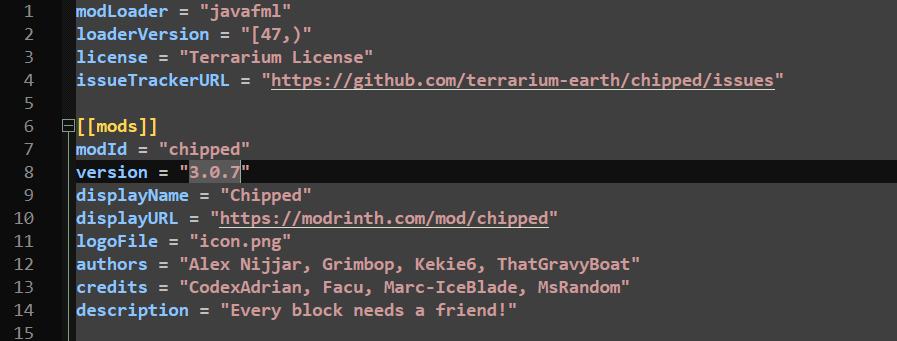
it should look something like this.
find the modId and copy it WITHOUT THE QUOTES. hop back over to MCreator and open Workspace Settings> External APIs, and add an entry to "Additional required mods" and paste it.
Open your Workspace Folder and go to MCreatorWorkspaces > Your ModID > run > mods and insert the mod there so it'll actually launch.
If I'm not mistaken, that should be it. Keep in mind, this is only to stop the player from playing your mod without the required mods. since idk what to do with AttributeFix, you should find a plugin for that, ik it exists.