

MCretor Plugin to add some Vanilla GUI bindings to custom blocks like Crafting Tables, it also adds some useful block and item related functions.
Hello and welcome to my first ever little plugin, I have seen a few people asking how to open the vanilla crafting table or other menus, well I was able to get this to work on mod I took ownership of so I have converted it to a plugin, and added a few useful functions down the line.
How to use:
- Download the zip and place it in your plugin folder for mcreator
- open/create a procedure
- find Quims Menus and play with the functions included, enjoy.
NOTE:
I know the images are broken I will fix them soon as I can.


Block Actions:

Item Data:

Vanilla GUI's:

Client Side:
Remember screen is not apart of the server jar files so don't trigger this on the server side or you will just create a crash.
Exambles:
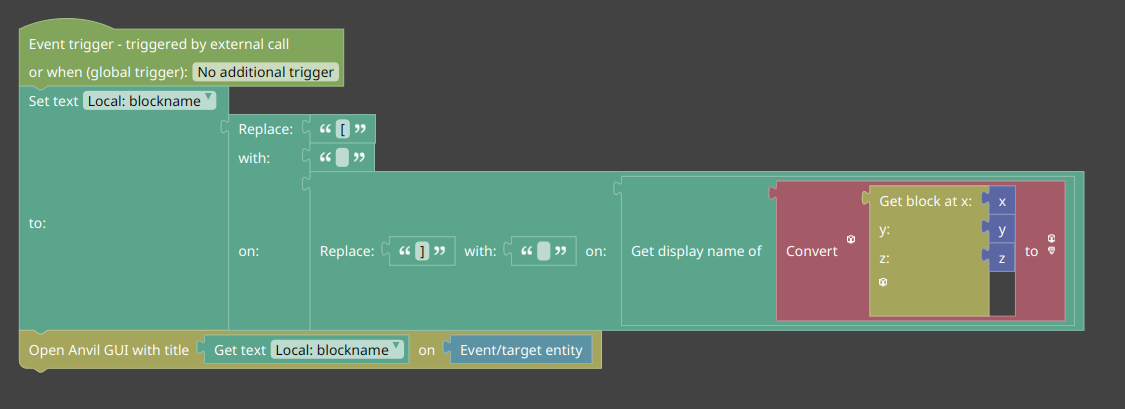
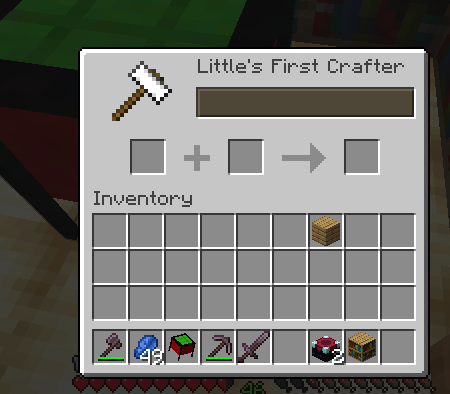


Supported Tables
- Crafting Table
- Enchantment Table
- Anvil
- Ender Chest
- Grindstone
- Smithing Table
- Loom
- Cartography Table
- Hopper
- Stonecutter
Tested MCreator Versions
- 2025.3
- 1.20.1, 1.21.1(NeoForge 21.1.190), 1.21.4, 1.21.8
- 2026.2
- 1.21.1(NeoForge 21.1.232), 26.1.2(NeoForge & Fabric)
Tested Minecraft Versions
-
[Supported] 1.21.1 | - NeoForge
-
[Unsupported] 1.21.4 | - NeoForge
-
[Unsupported] 1.21.8 | - NeoForge
-
[Supported] 26.1.2 | - NeoForge
-
[Unsupported] 26.1.2 | - Fabric
F.A.Q:
- Q) Why did you drop older support?
- A) Code base difference I am knew to all this and I can't maintain loads of versions sorry, I messed up some code and took me two long to make it work again so if you see your version not supported I am sorry.
- Q) What happened to 1.20.1
- A) It's gone from 0.0.0.8 at this time because I wasn't able to test it, it might be back in the future but please don't hold your breath.
Notes:
Newer versions of MCretor and Minecraft will be tested when I am able to,
I have a life, I am disabled and I am also learning this stuff as I go so some
updates might be slow.
* I will add custom note here when I have extra information and add it to the versions above
-
[Unsupported] - I wont be testing any more then basic does it boot and open a quick test.
-
[Supported] - Will try bug fix asap
-
[Untested] - Added it but unable to test it for some reason
I will be adding more in the future and will support different versions, I tested this with the MCreator version that I am using and the Minecraft I am using at this moment, I made this for myself first and wanted to share this with everyone else.
Comments


I have already replied to this, would be it be 2 hard no take what I have change it from 1.20.1 forge to 1.20.4 and then google the errors and changes they did between 1.20 1 to 4, but do I or will I, no because I have a life to live I can't maintain version that NO ONE and I mean no real person is playing I have no idea why you are stuck on a bad version of the game 1.20.1 is the last good forge version and 1.21.1 is the new good version for NeoForge Update or edit it yourself I already made it clear in a reply to you that it's out of date and I don't have time to maintain loads of versions.
MCreator dropps support fro 1.20.4 really fast, Forge community dropped support for it really fast, NeoForge community never really supported it anyway.
So I am sorry but I said no already I not sure why your asking again.

This is a good plugin, I was wondering if you can make a custom Recipe plugin system were users can set blocks with GUIs as crafting systems?