
Supported MCreator versions
2026.2

Downloads:
80
Upvotes: 1
Ever wanted to play a video in a GUI?
Now you can!
With this plugin, you can add videos WITH AUDIO to your custom GUI.
To install:
- Open Windows PowerShell and run
winget install Gyan.FFmpeg
Write-Host "Installed!"
exit- Reopen MCreator
- Import the zip as a plugin into MCreator
-
Tick Enable Java Plugins at the top
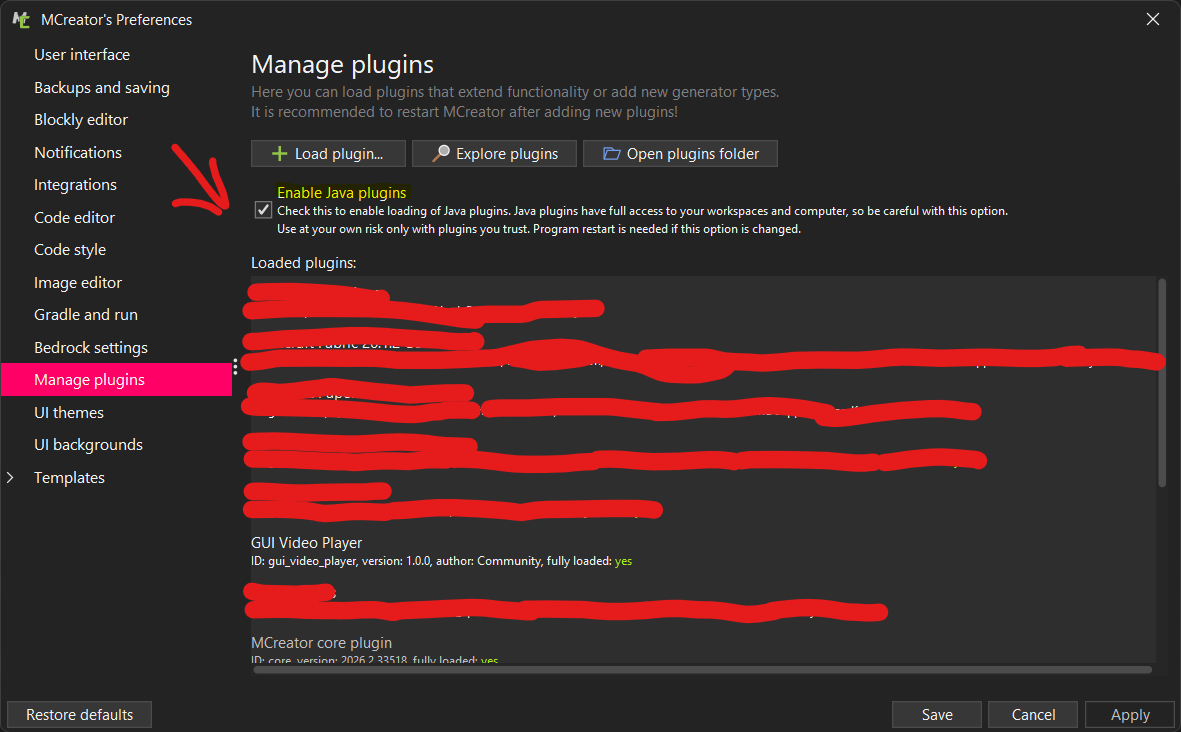
- Then restart MCreator 1 last time and use a NeoForged 26.1.2 workspace to use!
License
All Rights Reserved
Plugin downloads
This is version 1! Only on the Microsoft Windows Operating System for now... - gui-video-player.zip
Uploaded on: 09/20/2026 - 16:31 File size: 29.52 KB
Plugins may contain bugs, break workspaces, or alter the way MCreator operates.
Third-party plugins are provided "as is" and downloaded and used entirely at your own risk.


Wouldn't it have been better to do it as a GIF or hosted video?