

This plugin allows you to integrate custom recipes and JEI into your mod, together with wide array of side features to enhance your mod even futher.
Wiki:
For extensive information about this plugin check out the wiki:
zsemper.github.io/plugins/jei_integration/
Getting started:
To start you need to enable the JEI API under your workspace settings. You can still use the plugin without enabling the plugin, but it wont include the jei information and every element used for jei in the recipe types are disabled.
Setting up a recipe type:
The main mod element in this plugin is the "Recipe Type", which allows you to set up a recipe type for your custom recipes. To create one you need a texture that is 256 by 256 pixel large that is used in jei as a background for the recipe category, afterwards you need to specify the x and y coords together with the width and height to select the part of the texture that is used.
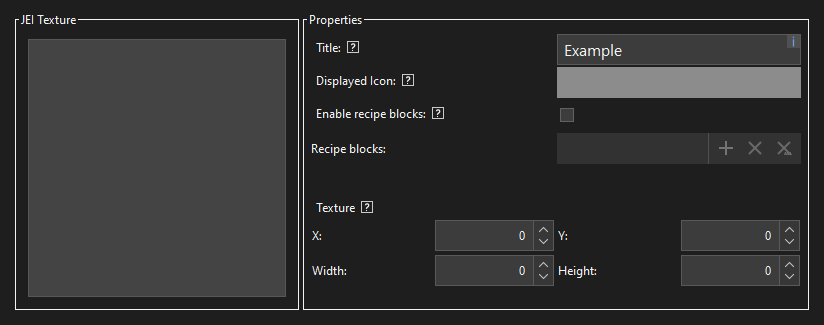
You also need to set a title and a displayed icon for the recipe category in jei.
The second page is the most important as it is used to set the actual slots and inputs/outputs of the recipe type.

The IO determines if the slot in an input or an output slot. The type can be one out of five types, either an item, a fluid, logic, a number or text. The name is the name that is used as a key in recipes and procedures, and to be unique for each slot in the recipe type. The x and y are only used for item and fluid type to set the location in the jei recipe category. Optional means that this slot can be left out in recipes and can be air in procedures. Logic, number and text slots require a default value if set to optional.
Creating a recipe:
To create a custom recipe select the recipe type the recipe is gonna use.
Below you can set the inputs and outputs, which follow almost the same structure as in the recipe type.

First set the type of the input/output, like in the recipe type, and secord set the name, which has to match the one set in the recipe type. Afterwards the item, fluid, logic, number or text input/output in the recipe.
Changelogs:
- v1.5.0:
- added procedure blocks to get the result of vanilla recipe types (like crafting or smelting)
- v1.4.4:
- Added fallback for when no icon for the jei category is selected
- Removed code that was mark as @Deprecated(forRemoval = true)
- Fixed Tooltips in jei category
- v1.4.3:
- moved reuseable methods into it's own class
- updated to mcreator 2025.3
- v1.4.2:
- removed deprecated methods
- v1.4.1:
- fixed issue with recipe/slot names starting with a number resulting in a compile error
- v1.4:
- fixed issues with recipe template and jei plugin template (cause mojang needs to change their code every version for some stupid reason)
- v1.3:
- recipes can now be bookmarked in jei
- moved click areas to properties tab instead to hav it's own tab
- v1.2:
- rendered texts in jei now require a color
- outputs can be set to optional
- number inputs can now be consumed by using the designed blocks
- fixed number compare block missing code
- v1.1:
- Fixed a bunch of code connected to optional ingredients
- added single item ingredient option
All changes can be found here:
Comments


Hey there!
My custom crafting table has a cybernetic cyan/black style instead of the normal monotone one (idk if this matters but I guess it does)
I'm struggling with the "256x256" texture, it gets rendered too big in the JEI tab. Sufficient to exit the tab "boundaries". It's a bit hard to explain without images or links to imgur, sorry if it seens confusing
also is there a way to set the output to air without breaking the recipe