

This plugin is well-maintained and widely used and has a proven track record in the community. As with all third-party plugins, use it at your own discretion.
Nerdy's Player Animator is a plugin that allows you to animate the player model with bedrock entity keyframe animations using blockbench
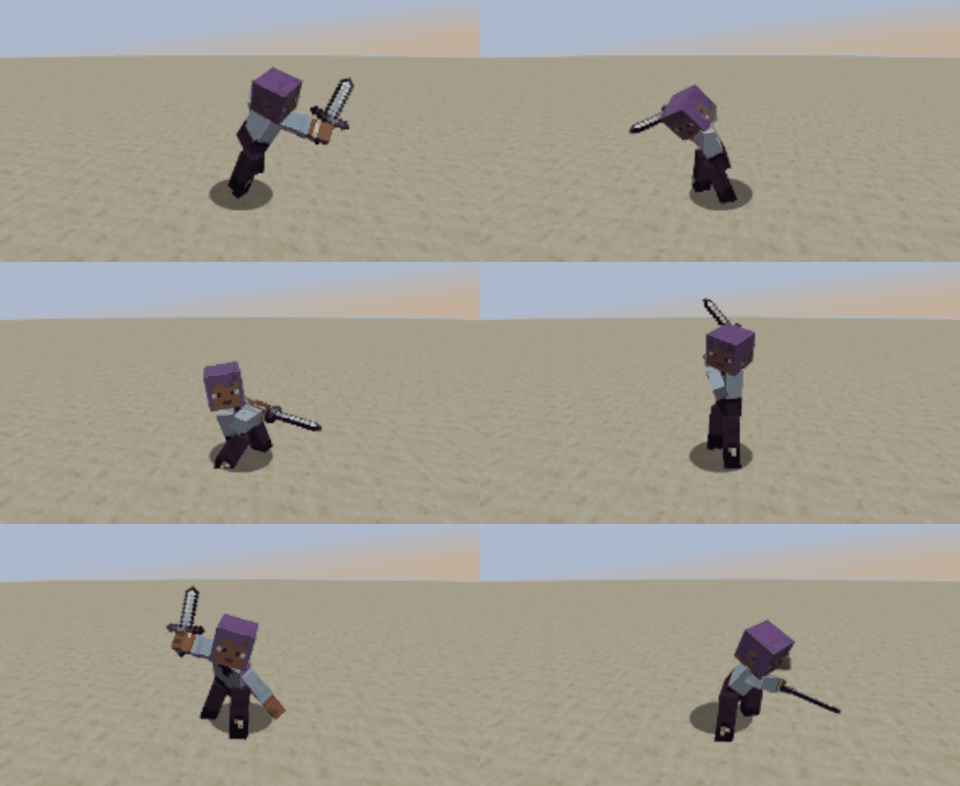
How to use
First, you will need to click here to download the official blockbench player model you will be animating. Now that you have the model, you will need to create animation for it in blockbench. If you do not know how to create and export blockbench model animations, watch a tutorial on how to do so.
Once you have your .json animations file, you will need to navigate to the resources section and find the new player animator tab. Here, you can import your files and preview the animations they contain.

Once you have imported your files, you can use the play animation procedure block, in which all your animations are listed.

You can also stop any ongoing animations using the stop animation procedure block. This will work on any other animations being played by mods using this plugin.

Important information
-
Java plugins must be enabled for the procedure blocks and player animations resource tab to work
-
This plugin requires the forge mixins plugin to be installed
-
No external dependencies are included in your mod, this is all using code provided by the plugin
-
The plugin should only be loaded if you plan on using player animations, as otherwise it will generate all of its player animation related code for no reason and bloat your mod
-
When playing the animation, it will respect the loop type set in blockbench; a looping animation will loop and a hold on last frame animation will freeze on the last frame, so you will need to use the stop animation procedure block to end them
-
You can find supported MoLang queries and math operations here
-
If you experience issues with flickering when playing animations, then make the procedure block only run on either the server or the client so it doesn't trigger twice

Changelog
v2.4.3
-Reposition the animation preview page's rotation pivot to be in the center of the player
-Cleaned up animation preview page code

v2.4.2
-Fix the player becoming invisible in the inventory after a first person animation in 26.1.2

v2.4.1 & 2.2.5
-Fix crashes when a fake player entity/npc is spawned in 26.1.2/1.21.8

v2.4
-Allow crouching during animations now unless left or right leg are animated

v2.3.1
-Fixed animations making the player floating arms in 26.1.2

v2.3
-Ported to MCreator 2026.2 and Minecraft 26.1.2

v2.2.4
-Fixed sleeves always being disabled in first person animations for 1.21.1
-Attempted to fix issue where the mcreator animation preview stopped working after a while

v2.2.3
-Fixed first person arms showing in all perspectives when using shaders

v2.2.2
-Fixed player animations not progressing for players that are offscreen in multiplayer

v2.2.1
-Fixed sound keyframes not replaying in loop animations
-Fixed first person animations sometimes flashing the player head on the screen when ending
-Fixed small incompatibility with custom entity models plugin rendering in first person

v2.2
-Sounds played from sound keyframes in player animations will now follow the player's position as they play

v2.0.4 (2025.3) & v2.1.1 (2026.1)
-Fixed mixin conflict with the player animator API mod

v2.1
-Ported to MCreator 2026.1

v2.0.3
-Major improvements to first person animation camera clarity
-Fixed first person animations not playing while the chat was open

v2.0.2
-Implemented a better layer hiding system for first person animations to prevent all render layers from rendering

v2.0.1
-Fixed player arms and armor sleeves not being hidden in first person when using the custom entity models plugin to hide them

v2.0
-Added support for 35 new molang queries
-Added support for new math operations

v1.9.4
-Fixed the body bone's pivot not being accounted for, leading to incorrect X and Z rotations

v1.9.3
-Fixed some incorrect positioning of third person item animations

v1.9.2
-Fixed sound keyframes not playing sounds set to play at 0 seconds

v1.9.1
-Fixed arm sleeves always being drawn in first person animations even if they were disabled
-Fixed third person animations not progressing at all if in first person for the local player

v1.9
-Added support for item bones on the arms of the player model to animate the held items too
(Download updated model attached on this page)

v1.8
-Refactored the animation loader to prevent any possible animation loading issues on servers
-Greatly improved clarity of animations played in first person
-Fixed player model being partially invisible in GUIs during first person animations

v1.7.1
-Fixed crashes caused by the v1.7 armor visibility fix

v1.7
-Added support for sound keyframes in animations
-Fixed the armor layer being rendered in first person animations

v1.6
-Added a new procedure block in the advanced category to play animations from strings
(Placed in advanced since it will crash the game if the name is incorrect)

v1.5.3 (2025.3)
-Fixed player "body" bone calculations being slightly off

v1.2.3 (2025.2)
-Fixed player "body" bone calculations being slightly off

v1.5.2
-Fixed other players' bodies being ivisible in 1.21.8 when using first person animations

v1.5.1 (2025.3)
-Fixed body parts in 1.21.1 sometimes desyncing

v1.2.2 (2025.2)
-Fixed body parts in 1.21.1 sometimes desyncing

v1.5
-Reworked to player animations tab to include an animations viewer

v1.4.1 (2025.3)
-Fixed piglins crashing the game in 1.21.1

v1.2.1 (2025.2)
-Fixed piglins crashing the game in 1.21.1

v1.4
-Added the option to play player animations in both third person and first person

v1.3
-Ported to MCreator 2025.3

v1.2
-Added support for all bedrock keyframe types
-Added limited support for molang
-Fixed player arm swinging being stopped even if the animation doesn't affect it

v1.1.1
-Fixed animations crashing in multiplayer with multiple players online

v1.1
-Added the check if animation is playing procedure block
-Added chinese translations (thanks to cdc1234)
-Changed the animation loader so animations for each mod use namespaces, you will need to save your procedures that play animations again or regenerate the code of the workspace to apply this change

v1.0.1
-Increased plugin weight to prevent other plugins overwriting its template generation

v1.0
-Plugin release

Legacy player animator versions archive:
1.8.1 for 2024.1
1.9 for 2024.1 and 2024.2
2.1 for 2024.3 and 2024.4Comments


When i try to add the block that play animations in a procedure (in this case, it need to play when a custom block is right-clicked) it gives me an error in the "Warnings and Errors" tab that says "Block play_animation is not supported by the selected generation. It will be skipped". When I'm in game and right-click it doesn't start.
Here's the procedure:
https://imgur.com/ygg5I32
And this is the error:
https://imgur.com/ELxU3dT

I'm having the same problem, and the error message doesn't make 100% sense to me, and most likely doesn't make sense to some others, too. I assume what it means by "generator" is the version of MCreator currently being used. I'm not sure, though. I'm using MCreator 2025.3 and installed the 2025.3 versions of both your plugin and the Forge Mix Ins plugin, so I'm not confident in my guess. Could you please explain what we need to do and what we have wrong? I'm still rather new to MCreator and I don't know what all the different terms like "generator" refer to. Thank you so much!!
ah, I think I have a guess of why it won't work. I installed another plugin that allows me to make a 1.20.1 Forge mod, and I assume that your plugin does not work with 1.20.1. Is this correct? I couldn't really find something that said it specifically works for ONLY 1.21.1 and above. Thank you for your time!


I think I read that wrong... So it ONLY works on neoforge correct?